WorshipScreen: Free Church Presentation Software for Worship Songs, Bible Verses and Sermons

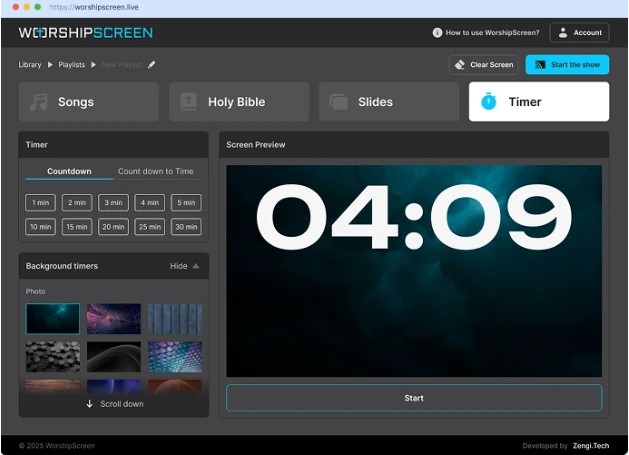
A church service can include many different visual elements: worship lyrics, Bible passages, sermon notes, announcements, photos, videos, countdowns, and welcome screens. When all of these elements have to be displayed during a live service, the church needs a reliable way to organize them. Switching between different applications and files can make the work of a media volunteer unnecessarily complicated.
WorshipScreen offers a practical browser-based solution for this task. It is designed as a universal presentation tool for churches that need to display different types of content on a projector, television, LED screen, or other compatible display. Songs, Bible verses, images, videos, and announcements can be prepared and managed from one workspace.
The platform is particularly useful for churches that want a simple solution without investing in expensive professional presentation software. WorshipScreen is free to use and can become part of a regular weekly workflow for worship teams, pastors, volunteers, and church media operators.
What Is WorshipScreen?
WorshipScreen is church presentation software focused on the practical requirements of a modern worship service. Its purpose is to help a church operator prepare visual content before the service and control that content while the service is taking place.
Instead of creating a separate presentation for every song and opening different programs for Scripture, videos, and announcements, a church can organize these materials in one environment.
The browser-based format also makes the initial setup straightforward. There is no need to install a large desktop application or maintain complicated presentation files on several computers. The church can access the service workspace through a browser and connect the computer to the display used in the auditorium.
This approach can be especially convenient for churches where presentation duties are handled by volunteers. A volunteer does not necessarily need advanced experience with professional audiovisual software to create a playlist and operate the presentation.
Why a Church Needs a Presentation System
The screen has become an important part of many worship services. Congregations use displayed lyrics to participate in songs, follow Scripture readings, read announcements, watch videos, and understand what is happening next.
The quality of the presentation can affect how easily people follow the service. If the wrong verse is displayed, a song changes unexpectedly, or a video cannot be found, the visual presentation can interrupt the flow of the service.
A dedicated church presentation system helps solve these practical problems by putting frequently used materials into a structured workflow.
The operator can prepare content ahead of time instead of searching for individual files during the service. Songs can be stored in a library, Scripture can be prepared before a sermon, and media can be placed into a playlist according to the order of the service.
A Free Tool for Church Presentations
One of the main reasons churches may choose WorshipScreen is that it provides the core functionality needed for presentation without requiring a paid professional software package.
Churches looking for free worship software can use WorshipScreen to organize lyrics, Scripture, images, videos, announcements, and other visual materials.
This can be particularly relevant to small churches and volunteer-led congregations where the presentation system needs to be affordable and easy to maintain. Instead of paying for multiple applications, the church can use one browser-based tool for many common presentation tasks.
The free approach also makes it possible to introduce presentation software gradually. A church can begin with basic song lyrics and Bible passages and later incorporate videos, announcements, countdowns, and other visual elements as its needs develop.
Connecting WorshipScreen to a Church Display
Before creating a service, the church should determine how the presentation will reach the congregation.
A common arrangement is a laptop connected to a projector, television, or LED screen. With an extended desktop, the operator can keep the WorshipScreen controls on the computer while sending only the presentation output to the congregation’s display.
This setup provides an important distinction between the operator’s workspace and the audience screen. The person controlling the service can see what is coming next without displaying editing controls or other unnecessary information to the congregation.
Some churches may use a television or another display with browser functionality. The exact equipment will depend on the church’s existing audiovisual system.
Whatever setup is selected, it should be tested before the service. Check the cable connection, display resolution, sound if videos are being used, browser performance, and internet connection.
Preparing Worship Songs
Worship songs are often the most frequently used presentation content, so creating a reusable song library can save considerable preparation time.
A song can be entered into WorshipScreen and formatted into presentation slides. Once it has been saved, the same material can be used again during future services.
This is useful when a church regularly returns to the same worship songs. Instead of copying lyrics into a new presentation every week, the operator can select the existing song and add it to the current service playlist.
Before using a song publicly, however, it is important to review the slides. The lyrics should match the version being performed by the worship team. If the team has changed the order of verses or added a bridge, the presentation should reflect that arrangement.
The text should also be easy to read. Large fonts, sufficient contrast, and sensible line breaks are generally more useful than placing a large amount of text on one screen.
Creating a Service Playlist
A playlist provides a structure for the entire service.
For example, a Sunday morning playlist might contain:
- a welcome screen;
- a countdown before the service;
- three worship songs;
- a Bible reading;
- an announcement slide;
- a short video;
- additional songs;
- sermon Scripture;
- closing information.
The exact structure can be adapted to the church’s service format.
Preparing the playlist in advance allows the operator to concentrate on timing during the service. Instead of searching through folders for each individual item, the operator can move through a prepared sequence.
It is also helpful to name playlists by date or service type. This creates an archive that makes it easier to locate previous services and reuse their content.
Displaying Bible Verses
Bible passages are another central part of church presentations.
When a pastor has prepared a sermon, the media volunteer can enter the expected Scripture references into WorshipScreen before the service. These passages can then be organized in the order in which they are likely to be used.
This is particularly useful during sermons that refer to several different passages. The operator does not have to type every reference while the pastor is speaking.
Bible content can also be used outside the sermon. A church may display a Scripture passage during worship, before the service begins, during prayer, or between different sections of the program.
At the same time, live services can change. A pastor may mention a passage that was not part of the original plan. Having a flexible presentation system makes it easier to respond to these changes instead of treating the prepared playlist as a fixed document.
Adding Images and Videos
A modern church presentation may contain much more than text.
A church might display photographs from a community project, show a promotional video for an upcoming event, play a testimony, or use a video background during worship.
WorshipScreen can bring these materials into the same presentation workflow. Images and videos can be prepared alongside songs and Scripture rather than being managed through separate applications.
This can reduce the number of windows that the operator needs to control during a live service.
When videos are part of the playlist, they should always be tested in advance. Check whether the video loads correctly, whether sound is available when required, and whether its aspect ratio is appropriate for the church display.
Using Backgrounds for Worship
Backgrounds can make a presentation visually consistent, but they should never make the content difficult to read.
WorshipScreen allows churches to use backgrounds for lyrics and other presentation elements. A church can select images or video backgrounds that match its visual identity or the atmosphere of a particular service.
For worship lyrics, contrast is especially important. A beautiful photograph is not useful if the text disappears against it.
A simple background can often be more effective than a highly detailed image. The objective is to support participation and communication, not to turn every slide into a graphic design project.
Churches can establish a consistent visual style by using similar fonts, background types, and layouts across different services.
Bilingual Church Presentations
Some congregations serve people who speak more than one language. In these situations, displaying information in two languages can help different members of the congregation participate together.
WorshipScreen can be used for bilingual songs and Bible passages. The presentation can contain both languages while the operator controls the sequence during the service.
However, bilingual presentations require careful formatting. Two languages can require more space, so font sizes and line breaks should be checked on the actual church display.
The goal should be to make both languages readable without overcrowding the screen.
Countdown Before the Service
A countdown is a simple feature that can make the beginning of a service more organized.
Instead of showing a static slide that says “Service starts soon,” a church can display a timer showing the remaining time. This gives visitors a clear indication of when the service will begin.
The timer can be combined with a background image or video. It can also be configured around a specific start time rather than simply counting down from a selected number of minutes.
For churches that regularly begin services at a fixed time, this can become part of the standard pre-service routine.
Preparing for a Live Service
Good preparation is more important than complicated technology.
Before the congregation arrives, the operator should open the complete playlist and review it from beginning to end. Songs should be checked against the worship team’s final set list. Bible references should be verified. Announcements should contain the current information, and videos should be tested.
The display should also be viewed from a distance. A presentation can look perfect on a laptop and still be difficult to read when projected onto a large screen.
It is worth checking the first slide, the final slide, transitions, backgrounds, and any content that will be shown immediately before or after the sermon.
A few minutes of preparation can prevent many avoidable problems during the service.
What to Do When the Service Changes
Church services rarely follow a script with absolute precision.
A worship leader might repeat a chorus. A pastor may decide to emphasize a different Bible passage. An announcement might need to be added. A video could be moved to another point in the program.
For this reason, church presentation software should not only support preparation. It should also allow the operator to make practical adjustments while the service is running.
With WorshipScreen, songs and Bible passages can be managed during the live presentation, allowing the operator to respond to changes instead of being restricted to a fixed sequence.
This is particularly helpful for volunteer operators who may need to make decisions quickly while also following the worship leader or pastor.
Using WorshipScreen for Methodist and Other Worship Services
Different denominations and congregations may have different traditions, service structures, and approaches to worship. The presentation requirements, however, often overlap.
A church may need to display hymns or contemporary worship songs, Scripture readings, sermon passages, announcements, prayer prompts, and multimedia content.
For churches searching for methodist worship software, WorshipScreen can be used to organize these presentation elements in a single browser-based workflow. The platform can be adapted to different service formats rather than requiring every congregation to follow one fixed presentation structure.
This flexibility can be useful for churches that have regular Sunday services as well as special events, youth meetings, prayer gatherings, Bible studies, or community programs.
A Practical Weekly Routine
The easiest way to use WorshipScreen is to turn preparation into a routine.
At the beginning of the week, collect the worship set list, sermon Scripture references, announcements, and any videos or images that will be needed. Add new songs to the library and update existing content when necessary.
Next, create the playlist for the upcoming service. Put the materials in the expected order and configure the countdown if one is required.
Before the service, test the complete presentation on the actual display. Correct any spelling errors, adjust difficult-to-read slides, and confirm that videos and images work correctly.
During the service, the operator should follow the worship leader and pastor rather than simply clicking through slides at a predetermined speed. The presentation should respond to what is happening in the room.
After the service, the playlist can be kept as a reference for future services. Frequently used songs and materials can remain in the library, reducing preparation time for the next week.
Conclusion
WorshipScreen is designed to make church presentations more organized without making the technology unnecessarily complicated. It brings worship songs, Bible verses, sermon materials, announcements, images, videos, backgrounds, and timers into one browser-based environment.
Because it is free to use, the platform can be a practical option for churches that need presentation functionality without purchasing expensive software. It can serve a small congregation with a single display just as it can support a more structured media workflow with dedicated volunteers.
The key to using any presentation platform successfully is preparation. Build the song library, prepare Scripture references, organize the service playlist, test the display, and check every multimedia element before the congregation arrives.
Once this routine becomes familiar, the presentation operator can spend less time dealing with files and applications and more time supporting the actual service. WorshipScreen provides the tools to make that workflow simple, flexible, and suitable for worship services of different formats.